How to connect Google Search Console to Fullturn with a service account
By the Fullturn team · · 4 min read
Connecting Search Console lets Fullturn read how your pages perform on Google (clicks, impressions, average position by query and page), check whether each new article is indexed, and send your sitemap to Google after it publishes.
Fullturn does not use Google sign-in for this. It uses a service account: a robot account in Google Cloud that you invite to your Search Console property, just like adding a colleague. You paste the robot's key into Fullturn once.
What you need first
- A Google account with access to the Search Console property for your site, as an owner, so that you can add a user.
- A Google Cloud project (a free one is fine). Fullturn does not need billing turned on for this.
- A site already added in Fullturn. See set up your first SEO site.
- A Fullturn role that can change Settings, then Integrations.
Steps
1. Enable the Search Console API in Google Cloud
In the Google Cloud console, choose or create a project, open APIs & Services, find Google Search Console API, and press Enable.
Screenshot: Google Cloud console with the Google Search Console API enabled 2. Create a service account and download its key
Open IAM & Admin, then Service Accounts, and create one named Fullturn. It needs no Google Cloud roles. Open the new account, go to Keys, choose Add key, then Create new key, and pick JSON. Google downloads a file.
Open the file. It contains two values Fullturn needs:
client_email(the robot's address, which ends in.iam.gserviceaccount.com) andprivate_key. Keep the file private. Anyone with it can act as the robot.Screenshot: Google Cloud service account Keys tab with Create new key, JSON 3. Add the service account to Search Console
In Google Search Console, open your property, then Settings, then Users and permissions, and add the service account's
client_emailas a user. Fullturn asks for Owner, which is what its own prompts tell you to give; a Full user also lets it send sitemaps.Screenshot: Search Console Users and permissions with the service account added 4. Paste the key into Fullturn
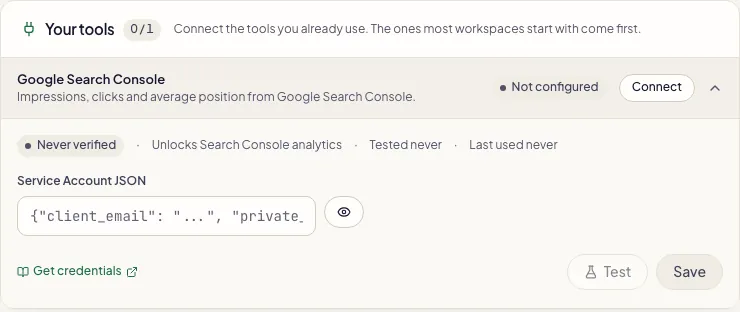
In Fullturn, open Settings, then Integrations, and find the Google Search Console card in the SEO group. Paste the whole contents of the JSON file into Service Account JSON and save. Fullturn stores it encrypted.
5. Check it worked
Open Content, then Site settings, and find the Search Console card. After the first run it reads "Sitemap sent to Search Console on …" with a Sitemap accepted pill. Until then it reads "No sitemap submission has been recorded yet. The daily indexing run records the result here." That is normal on the first day.
What Fullturn does with the access
- Reads search analytics each day: clicks, impressions, click-through rate and position by site, query and page.
- Feeds the positions of the keywords you track.
- Sends your sitemap and checks article indexing with URL Inspection.
To cut access off, remove the service account from Users and permissions in Search Console, or delete the key in Google Cloud.
Common errors and fixes
- Give Fullturn access: in Search Console, open Settings, then Users, and add the account you connected in Fullturn under Settings, then Integrations, as an Owner.
- This appears next to a failed sitemap submission. The service account is not a user of the property Fullturn uses, or has too little permission. Add the
client_emailas an Owner, on the property that matches your site address. - Sitemap submission failed on …
- Open Technical detail under the message to read the HTTP code and Google's own words. A 401 or 403 is a permission problem, handled above.
- The last sitemap submission could not be loaded. Refresh the page to try again.
- Fullturn could not read the record. Refresh. It does not mean Google refused anything.
- No sitemap submission has been recorded yet. The daily indexing run records the result here.
- The first run has not happened yet. Come back tomorrow.
- Nothing shows up in Search Console data
- Check the key is the whole JSON with
client_emailandprivate_key, and the property is a URL-prefix property equal to your site address. A brand-new property has no history to read.
FAQ
- Why a service account and not Sign in with Google?
- A service account is a robot you invite to one property. It does not give Fullturn access to the rest of your Google account.
- Does Search Console cost anything?
- No. Search Console, the Search Console API and a free Google Cloud project cost nothing for this use.
- Does Fullturn push my articles to Google?
- Not directly. Google's Indexing API is only for job posting and livestream pages. Fullturn sends your sitemap and checks indexing; Google decides when to crawl.
- How long until an article is indexed?
- Google gives days to weeks and no API promises 48 hours. Fullturn checks at 12 hours, 24 hours, 48 hours and 7 days and escalates a page that is still not indexed.
- Can several sites share one service account?
- Yes. Add the same service account to each property.