How to connect the HubSpot blog to Fullturn to publish articles automatically
By the Fullturn team · · 4 min read
If your blog lives in HubSpot's Content Hub, Fullturn can create and update its posts. You create a private app in HubSpot, give it the content permission, and paste its token into Fullturn with the number of the blog the articles go into.
This is about the HubSpot CMS blog. Fullturn also has a separate HubSpot contacts sync, which is a different feature.
What you need first
- A HubSpot account with a Content Hub blog and rights to create private apps.
- A private app token with the content scope. Add the files scope if you want Fullturn to upload article images into HubSpot's file manager.
- The blog's numeric ID.
Steps
1. Create the private app
In HubSpot, open Settings, then Integrations, then Private Apps, and create an app named Fullturn. On the scopes tab, tick content, and files if you want images uploaded. Create the app and copy its access token.
Screenshot: HubSpot private app scopes tab with content ticked 2. Find the blog ID
The blog ID is the number of the blog the articles go into. In HubSpot, open Content, then Blog, then Settings for that blog. Copy the number.
3. Choose HubSpot in Fullturn
In Fullturn, open Content and start Set up your website. In step 1, choose HubSpot (beta) and press Continue.
4. Enter the token and blog ID
In step 2, fill in these boxes, then press Check connection:
- Website address: your site.
- Private app token: the token from step 1.
- Blog ID: the number from step 2.
- Blog's public address (optional): the address visitors read the blog on, so links inside articles are treated as your own site's links.
- HubSpot account ID (optional): shown at the top right of HubSpot. It lets Fullturn notice if the connection is later pointed at another account.
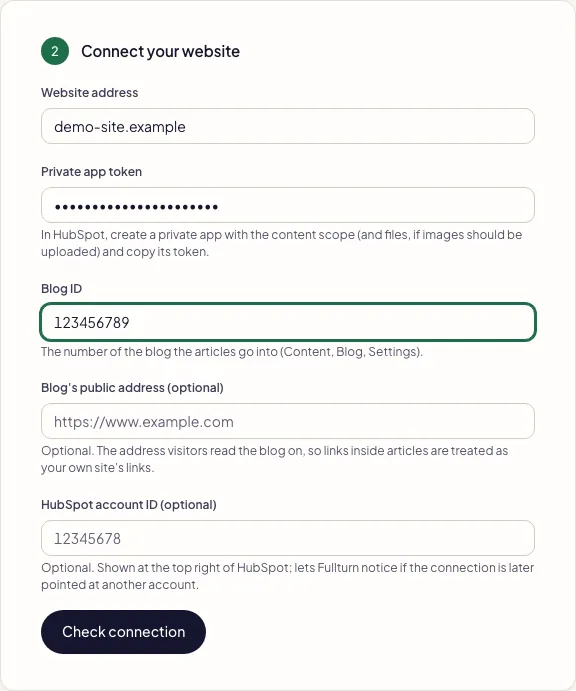
5. Read the connection check
A good check says "Fullturn can connect to your HubSpot site." The test only reads your blog. HubSpot accepting the token for reading does not prove it may create posts, and that is only confirmed when the first article goes out. Publish a first article through the review queue and read it in HubSpot.
Optional settings
After the connection exists, Content, Publishing lets you edit the HubSpot destination. Optional boxes include Blog author ID, API version (2026-09 by default; use v3 to select the older path if HubSpot retires a version), Upload images (true or false) and Image folder.
Common errors and fixes
- HubSpot refused these details. Check the key or token and try again.
- HubSpot answered 401 or 403. Check you copied the token, that the private app is installed, and that it has the content scope.
- HubSpot answered in an unusual way, so Fullturn did not save the connection.
- The usual cause is a blog ID that does not exist in the account the token belongs to. Copy the ID again from the right account. Fullturn saved nothing.
- Use the numeric HubSpot blog ID
- The blog ID is digits only.
- Use the numeric HubSpot blog author ID
- Blog author ID is optional, but if filled it must be digits only.
- Use v3 or a version such as 2026-09
- API version is either
v3or a year-month version. - HubSpot did not confirm the uploaded file URL. The token needs the files scope.
- Add the files scope to the private app, or set Upload images to false.
- HubSpot did not confirm the expected blog post identity. Reconcile the destination before retrying.
- HubSpot answered with a different post than expected. Open the blog and check before you publish again, so you do not get a duplicate.
- Fullturn could not reach that address. Check it is your public website.
- The website address you entered is not reachable from the internet. Use your public address.
FAQ
- Is HubSpot blog publishing supported?
- It is in beta. The connector has been tested against a stand-in for HubSpot's API, not a real account.
- Is this the same as the HubSpot contacts sync?
- No. This connector publishes blog posts. The contacts sync is separate and has its own beta status.
- Which scopes does the token need?
- content is required. files is only for uploading images.
- Does Fullturn upload images?
- Yes when the token has the files scope and Upload images is on. Otherwise the article publishes without an uploaded image.
- Can I use HubSpot's older API?
- Yes. Set API version to
v3in the destination.