How to connect Outlook or Microsoft 365 to a cold email tool (Fullturn)
By the Fullturn team · · 4 min read
Microsoft no longer accepts a plain password for mail servers, so a Microsoft mailbox cannot be connected by typing server details. Fullturn connects it with Microsoft sign-in instead. You sign in on Microsoft's own page, so Fullturn never sees your password.
This works for work and school accounts (Microsoft 365) and for personal accounts such as outlook.com, hotmail.com and live.com.
What you need first
- The Outlook or Microsoft 365 address you want to send from, and its sign-in.
- For a work or school account: some organisations only let an administrator approve new apps. If Microsoft's page says so, you need your Microsoft 365 admin.
- A Fullturn role that can connect mailboxes (not read-only).
Steps
1. Open Connect mailbox
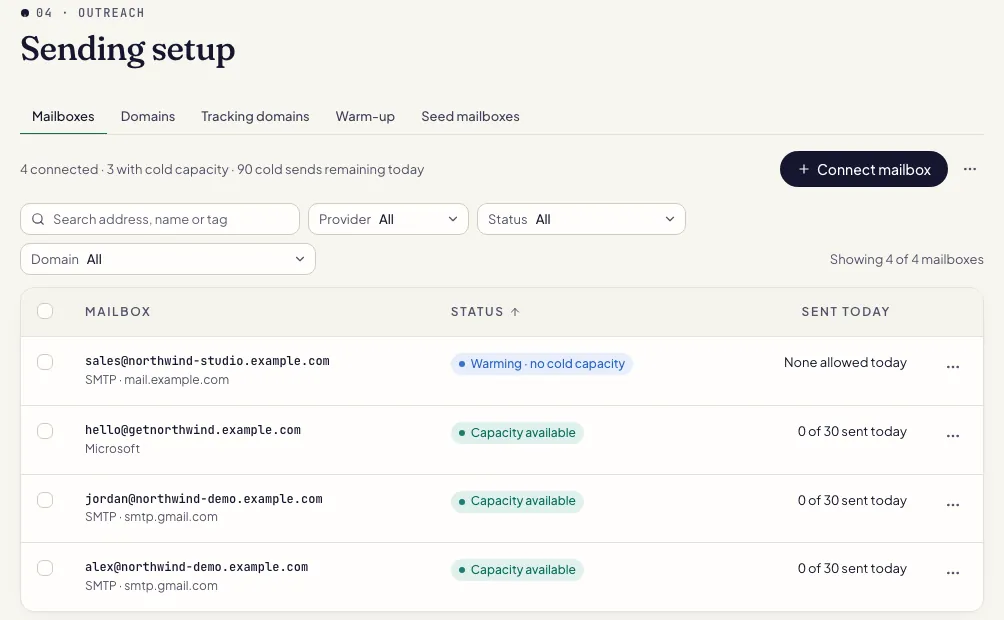
In Fullturn, open Outreach, then Sending setup, then the Mailboxes tab, and choose Connect mailbox.
2. Choose Microsoft 365 / Outlook
Pick the tile named Microsoft 365 / Outlook. It says work, school and personal accounts (outlook.com, hotmail.com, live.com) are supported.
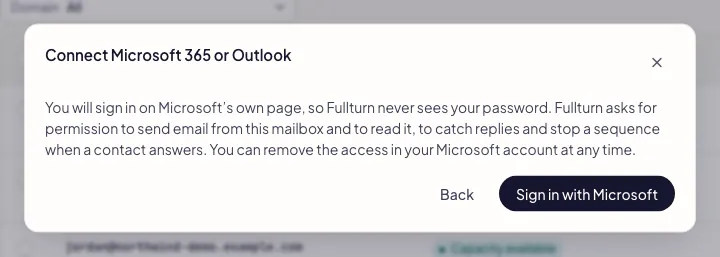
Fullturn explains what it will ask for: permission to send email from this mailbox and to read it, to catch replies and stop a sequence when a contact answers. You can remove the access in your Microsoft account at any time.
3. Sign in with Microsoft
Press Sign in with Microsoft. Microsoft's own page opens. Choose the account, sign in, and accept the permissions it lists.
Screenshot: Microsoft consent screen listing the permissions Fullturn asks for 4. Return to Fullturn and check the mailbox
Microsoft sends you back to the Mailboxes tab with the new mailbox in the list and warm-up switched on. New mailboxes start on a slow warm-up before they send cold email. Outlook.com, hotmail.com and live.com addresses are personal mailboxes, so their warm-up starts at 3 emails a day and tops out at 20; a company domain starts at 2 a day and tops out at 40.
Why not SMTP and IMAP for Microsoft?
If you type a Microsoft server such as smtp.office365.com into the SMTP / IMAP form, Fullturn stops you and sends you back to this route. See how to connect any mailbox by SMTP and IMAP for providers that still use passwords.
Common errors and fixes
- The sign-in link expired or was already used. Start again from Mailboxes.
- The sign-in must be finished in one go. Go back to Mailboxes, choose Connect mailbox again, and do not reuse an old tab or the back button.
- Access was declined on the sign-in screen, so nothing was connected. Start again from Mailboxes.
- Microsoft sent back a refusal, usually because the consent screen was cancelled. Start again and accept the permissions. For a work account, an administrator may need to approve the app.
- The provider did not accept the sign-in. Start again from Mailboxes.
- Fullturn could not complete the sign-in with Microsoft. Try again; if it repeats, try a private browser window with only this Microsoft account signed in.
- Fullturn signed in but could not read the mailbox address. Start again from Mailboxes.
- Microsoft did not hand over the email address. Sign in again with the account that owns the mailbox, not a guest or alias.
- The mailbox signed in but Fullturn could not save it. Start again from Mailboxes.
- Nothing was saved. Try the whole sign-in once more. If it fails again, the mailbox may already be connected; check the Mailboxes list first.
- Your plan's mailbox limit is reached, so nothing was connected. Upgrade in Settings → Billing to connect more.
- Remove a mailbox you do not use, or upgrade your plan.
- Your role is read-only, so it cannot connect mailboxes. Ask an owner or admin to connect it.
- Ask a workspace owner or admin to connect the mailbox.
- smtp.office365.com is a Microsoft server, and Microsoft no longer accepts a password for it. Microsoft sign-in is required: go back and choose Microsoft 365 / Outlook.
- You picked SMTP / IMAP for a Microsoft mailbox. Go back and use the Microsoft tile, as in step 2.
FAQ
- Does Fullturn see my Microsoft password?
- No. You type it only on Microsoft's own page. Fullturn receives permission to send and read mail for this mailbox, and you can withdraw that permission in your Microsoft account.
- Can I connect a personal Outlook.com address?
- Yes. Work, school and personal accounts are supported. A personal mailbox warms up more gently and has a lower ceiling than a company mailbox.
- Why is there no password option for Microsoft?
- Microsoft has retired password sign-in for its mail servers. Sign-in with Microsoft is the only supported route, and Fullturn will not accept a Microsoft server in the SMTP / IMAP form.
- Does Fullturn read my whole mailbox?
- It reads the mailbox to catch replies to your campaigns so a sequence stops when someone answers. It sends only emails you have approved from this mailbox.
- How do I disconnect the mailbox?
- Choose Disconnect on the mailbox page in Fullturn, and remove the app's access in your Microsoft account settings.