How to connect any mailbox to cold email with SMTP and IMAP
By the Fullturn team · · 6 min read
If your mailbox is not Gmail, Google Workspace or Microsoft, you connect it with SMTP (the server that sends) and IMAP (the server that lets Fullturn read replies). It works with Zoho, Yahoo, iCloud, GoDaddy, Titan, your own host, or any other mail server that accepts a username and password.
Fullturn tests both servers before it saves anything, and it tells you in plain words what failed.
What you need first
- The mailbox address and the password your provider tells you to use for mail programs. Some providers need a separate app or mailbox password; check your provider's help for "SMTP settings".
- The outgoing (SMTP) and incoming (IMAP) server names and ports from your provider. Fullturn fills them in when it recognises the provider.
- IMAP switched on for the mailbox. Without it, Fullturn cannot see replies.
Steps
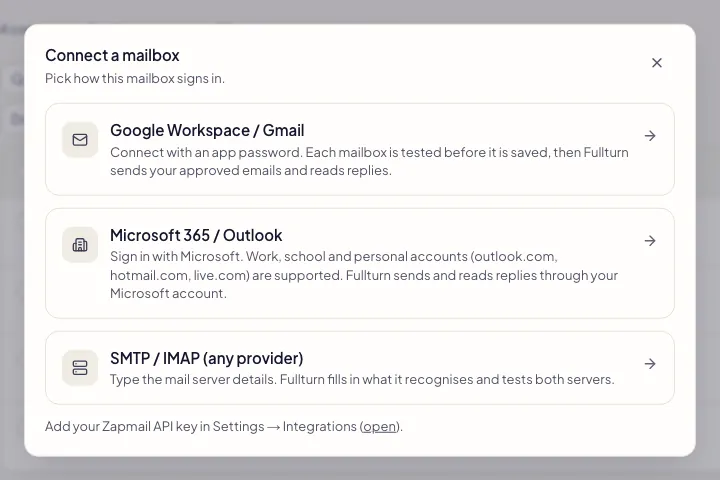
1. Open Connect mailbox and choose SMTP / IMAP
Open Outreach, then Sending setup, then Mailboxes, and choose Connect mailbox. Pick the tile named SMTP / IMAP (any provider).
2. Enter the name and address
Fill in Display name (what recipients see) and Email address. When you leave the address box, Fullturn looks at the domain and fills in the servers it recognises. A banner tells you what it found. If it says it is a guess, check it with your provider before you test.
The SMTP and IMAP usernames follow the address until you type something different.
3. Check the outgoing (SMTP) server
- SMTP host: for example
smtp.company.com. - SMTP port and Encryption: port 465 pairs with SSL/TLS and port 587 with STARTTLS. Port 25 is set to None, which sends the password unencrypted, so choose STARTTLS for it or use 587. Fullturn picks the usual encryption when you type a port, until you choose one yourself. Fullturn only connects to mail ports: 25, 465, 587 or 2525 for SMTP.
- Username and Password: the mailbox login.
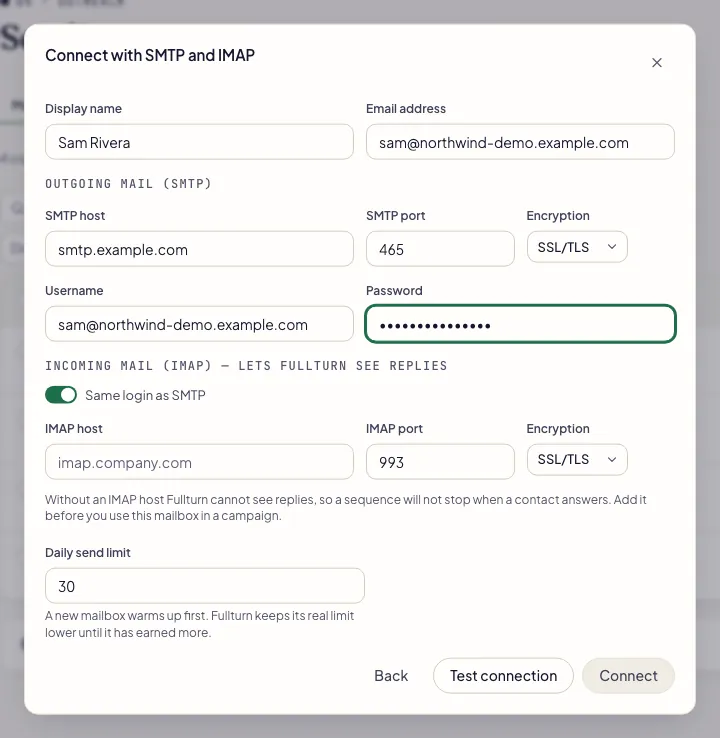
- SMTP host: for example
4. Check the incoming (IMAP) server
Fill in IMAP host, IMAP port (143 or 993) and its Encryption: port 993 pairs with SSL/TLS and 143 with STARTTLS. Leave Same login as SMTP on unless your provider uses a different login for incoming mail; if you switch it off, enter the IMAP username and IMAP password.
5. Set a daily send limit
Daily send limit is prefilled with 30. A new mailbox warms up first, and Fullturn keeps its real limit lower until the mailbox has earned more, so 30 is a ceiling and not a promise.
6. Test, then connect
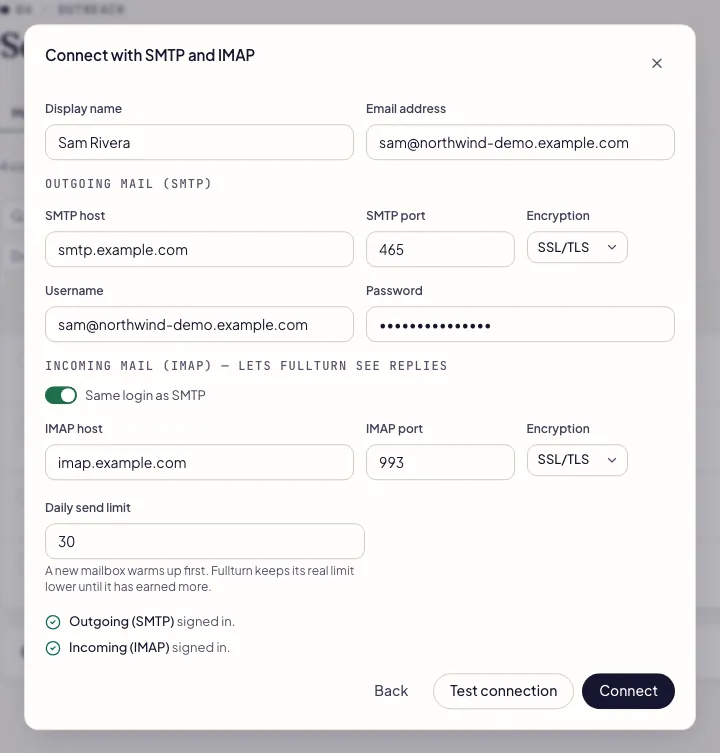
Press Test connection. Fullturn checks the outgoing server and the incoming server separately and shows a line for each: signed in, or the reason it failed, with the server's own words underneath.
When both pass, press Connect. If you change anything after a test, the button waits until you test again: "You changed something after this test. Test again to connect."
Common errors and fixes
- mail.example.com on port 587 rejected the username or password. Check both. Gmail usually needs an app password rather than the normal one, and SMTP sending must be allowed for the mailbox.
- The server answered and said no. Check the username (some providers want the full address, others only the part before the @), the password, and that SMTP sending or IMAP access is switched on for the mailbox in your provider's settings. For the IMAP leg the message ends "IMAP must be switched on for the mailbox".
- mail.example.com on port 465 did not answer as the chosen encryption expects. Try SSL/TLS for ports 465 and 993, STARTTLS for ports 587 and 143.
- The port and the encryption setting do not match. Use SSL/TLS with 465 or 993, and STARTTLS with 587 or 143.
- The server name mail.example.com could not be found. Check the spelling of the SMTP host.
- Check the host name for typos. Use the mail server name your provider gives you, not your website address.
- mail.example.com on port 587 refused the connection. Check the port, and that SMTP is switched on for this mailbox.
- Nothing is listening on that port, or the provider blocks it. Try the other port your provider lists.
- mail.example.com on port 587 did not answer in time. Check the host and port, and the encryption: a wrong choice often looks like silence.
- Most often the encryption choice is wrong for the port. Try the other pairing from step 3.
- The security certificate of mail.example.com is not valid for that name. Check the host name, or ask your provider for the right server.
- You used a name the provider's certificate does not cover. Ask your provider for the exact server name.
- Fullturn only connects to mail ports (25, 465, 587 or 2525). Port 2222 is not one of them.
- Use one of the listed ports. For IMAP the allowed ports are 143 and 993.
- mail.example.com points to a private network, so Fullturn will not connect to it. Use your provider's public mail server name.
- Fullturn only connects to public mail servers. Use the provider's public name.
- smtp.office365.com is a Microsoft server, and Microsoft no longer accepts a password for it. Microsoft sign-in is required: go back and choose Microsoft 365 / Outlook.
- Use the Microsoft tile. See how to connect Outlook or Microsoft 365.
- Too many connection tests. Wait a few minutes and try again.
- Fullturn limits how often you can test. Wait a few minutes before trying again.
- No mail server was found for example.com. Check the address, or fill in the server details yourself.
- Fullturn could not find mail servers for that domain. Check the address for typos, or type the servers in yourself.
FAQ
- What is the difference between SMTP and IMAP?
- SMTP sends mail out. IMAP lets Fullturn read the mailbox so it can see replies and stop a sequence when someone answers. Fullturn needs both for a campaign.
- Can I connect a mailbox with SMTP only?
- The form lets you, but without IMAP Fullturn cannot see replies, so a sequence keeps going after a contact answers. Add IMAP before you use the mailbox in a campaign.
- Does Fullturn warm up an SMTP mailbox?
- Yes. A mailbox saved here starts with warm-up on, like every other mailbox. See email warm-up and the warm-up network.
- Is my password stored safely?
- Fullturn stores mailbox passwords encrypted and tests the login before saving.
- Why does my provider want an app password?
- Many providers block your normal password for mail programs and issue a separate one. Create it in your provider's security settings and paste it in the Password box.