Gmail app password for cold email: connect Gmail or Google Workspace to Fullturn
By the Fullturn team · · 6 min read
To send cold email from a Gmail or Google Workspace address, Fullturn needs a way into the mailbox. It does not ask Google for access to your account. You give it an app password instead: a separate 16-letter password that works for this one connection and that you can delete at any time.
This guide takes about five minutes for one mailbox. If you have many mailboxes from a reseller, read how to import Zapmail mailboxes after this.
What you need first
- The Gmail or Google Workspace address you want to send from, and its normal password to sign in to Google.
- A phone or other second factor, because Google only offers app passwords once 2-Step Verification is on.
- For Google Workspace: either admin rights, or an admin who can allow IMAP and app passwords for your account.
- A Fullturn account with a role that can connect mailboxes. A read-only role cannot, and the screen says so: "You have read-only access to mailboxes."
Steps
1. Turn on 2-Step Verification
Open myaccount.google.com/security, sign in to the mailbox you want to connect, and turn on 2-Step Verification. Google only offers app passwords once it is on.
Screenshot: Google Account security page with 2-Step Verification turned on 2. Create an app password
Open myaccount.google.com/apppasswords. Name it Fullturn and choose Create. Google shows 16 letters in four groups. Copy them now: Google does not show them again.
Screenshot: Google app passwords page showing a new 16-letter password named Fullturn 3. Make sure IMAP is on
Fullturn reads replies over IMAP. For a personal Gmail address: in Gmail, open Settings, then Forwarding and POP/IMAP, and set IMAP access to Enabled. For Google Workspace: an admin must allow IMAP and app passwords for your account in the Admin console (Apps, Google Workspace, Gmail, End User Access). If your Google Workspace is managed by someone else, ask them to do this and to send you the app password.
4. Open Connect mailbox in Fullturn
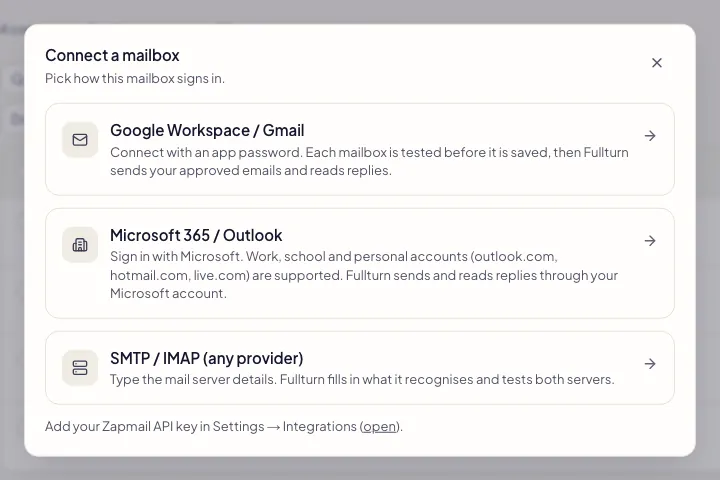
In Fullturn, open Outreach, then Sending setup, then the Mailboxes tab. Choose Connect mailbox, then the tile named Google Workspace / Gmail.
5. Paste the address and the app password
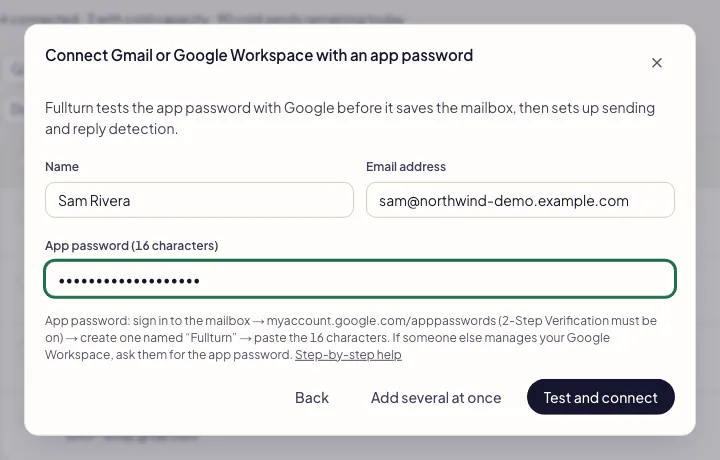
Fill in Name (the name recipients see, such as Sara Ali), Email address, and App password (16 characters). The spaces Google shows in the middle are fine.
Press Test and connect. Fullturn logs in to Gmail's mail server with the app password first and saves the mailbox only if Google accepts it.
6. Check the mailbox is warming up
The new mailbox appears in the list with warm-up switched on. A mailbox with no sending history should not send cold email on day one, so Fullturn starts it on a slow warm-up. The default daily send limit for a mailbox is 30, and the real limit stays lower until the mailbox has earned more. Read email warm-up and the warm-up network for what happens next.
What Fullturn does with the app password
Fullturn uses the app password for two things: sending the emails you have approved from this mailbox, and reading its replies so a sequence stops when someone answers. It does nothing else with your mailbox. Fullturn stores the app password encrypted.
Fullturn does not connect Gmail through Google sign-in. Google sign-in is used only to sign in to Fullturn itself; a Gmail or Google Workspace mailbox is always connected with an app password.
To stop Fullturn at any time, open myaccount.google.com/apppasswords, find the app password named Fullturn, and remove it. Fullturn can no longer reach the mailbox. You can also choose Disconnect on the mailbox page in Fullturn.
Connect several Google mailboxes at once
On the same screen, choose Add several at once. Paste one mailbox per line in the form email, app password, name. Fullturn accepts up to 25 lines in one go, tests every line against Gmail, saves the ones that pass, and tells you the reason for each line that fails. A header line such as Email, Password, Name is ignored.
Common errors and fixes
- Google rejected the app password — check 2-Step Verification is on and the password was created for this mailbox
- The most common cause is an app password made while signed in to a different Google account, or a typo. Check that 2-Step Verification is on for exactly this address, make a fresh app password while signed in to it, and paste that. On Google Workspace, also ask your admin whether app passwords are allowed for your organisation.
- no app password found (16 characters from myaccount.google.com/apppasswords)
- Only a line with no 16-letter password was pasted. In the several-at-once box, put the app password on the same line as the address.
- already connected
- This address is already a mailbox in your workspace. Open it from the Mailboxes list instead. To reconnect a mailbox that was connected with Google sign-in before, choose Reconnect with an app password on its row; it keeps its history and settings.
- Your plan's mailbox limit has been reached.
- Your plan includes a set number of mailboxes. Remove a mailbox you no longer use, or upgrade under Settings, then Billing.
- Google did not accept these details. Check the email and the app password.
- Fullturn shows this when Google gives no more specific reason. Make a new app password and try once more; a mailbox that is locked or suspended by Google needs to be fixed in Google first.
- smtp.gmail.com on port 465 rejected the username or password. Check both. Gmail usually needs an app password rather than the normal one, and SMTP sending must be allowed for the mailbox.
- This is what the SMTP / IMAP tile shows when a normal Google password is used. Go back and use the Google Workspace / Gmail tile with an app password.
FAQ
- Why does Fullturn use an app password and not Google sign-in?
- An app password gives Fullturn exactly two jobs, sending the emails you approve and reading replies, and you can delete it in one click. Fullturn does not request Gmail permissions from Google.
- Is a Gmail app password safe?
- It is a separate password for one connection, and Fullturn stores it encrypted. It cannot be used to change your Google account settings, and removing it at myaccount.google.com/apppasswords cuts Fullturn off immediately.
- Can I use a personal @gmail.com address for cold email?
- Fullturn will connect it, but a personal address has a lower safe volume. Warm-up for a personal Gmail starts at 3 a day and stops growing at 20 a day. For real outreach, use a Google Workspace address on your own domain.
- I do not see the app passwords page.
- Google hides it until 2-Step Verification is on, and some Workspace organisations switch app passwords off. Turn on 2-Step Verification first. If the page is still missing, ask your Workspace admin to allow app passwords.
- Does this work for replies too?
- Yes. The same app password lets Fullturn read the mailbox over IMAP, so a sequence stops when a contact answers. Check that IMAP is on, as in step 3.
- What if the mailbox stops sending later?
- Open the mailbox in the Mailboxes list and read the reason shown there. If Google no longer accepts the app password (for example because it was deleted), make a new one and reconnect the mailbox with it.