Email warm-up and the Fullturn warm-up network: how it works and how to set it
By the Fullturn team · · 6 min read
A new mailbox has no sending history, so mailbox providers do not know whether to trust it. Warm-up builds that history gradually: the mailbox sends a small, rising number of harmless emails to other mailboxes, which open and reply to them, before it sends your cold email at full volume.
Fullturn switches warm-up on for every mailbox you connect. This guide explains what it does, where to see it, and how to change it.
What you need first
- A connected mailbox. Warm-up works for every provider except a mailbox connected with a Google sign-in. Gmail and Google Workspace mailboxes connected with an app password, Microsoft mailboxes and SMTP / IMAP mailboxes all warm up.
- A role that can change mailboxes, to change the volume. Anyone else can view.
Steps
1. Find the Warm-up page
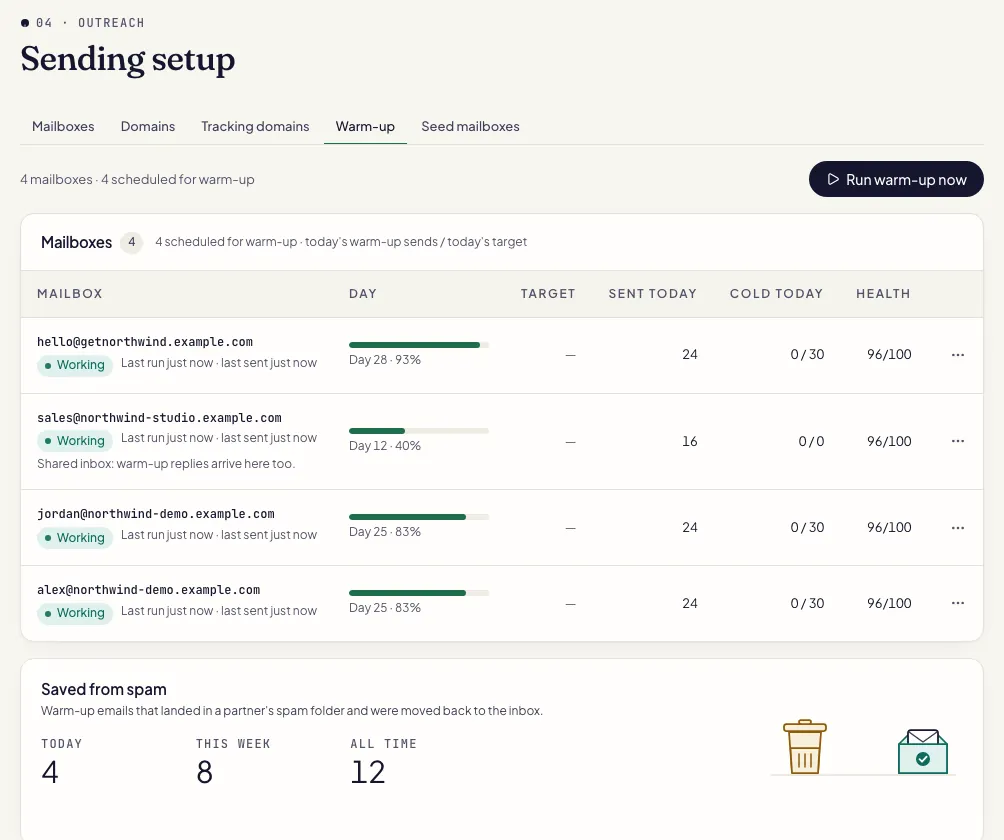
Open Outreach, then Sending setup, then the Warm-up tab. It appears when you have at least one mailbox that can be warmed up. It lists each mailbox with its warm-up day, today's volume and its status.
2. Know the starting volume
A new mailbox starts at 2 emails a day and adds 2 a day up to a ceiling of 40 a day. A personal address (gmail.com, outlook.com, hotmail.com, live.com, yahoo.com, icloud.com and similar) starts at 3 a day and stops at 20, because personal mailboxes tolerate less.
The page's How warm-up works section lists the same idea in six lines: it starts small and adds a little each day; warm-up mail moves between mailboxes; automatic replies build engagement signals; mail that lands in spam is rescued to the inbox; the daily volume follows your ramp and sending limits; and health scores and seed-inbox tests measure where mail lands.
3. Change the volume if you must
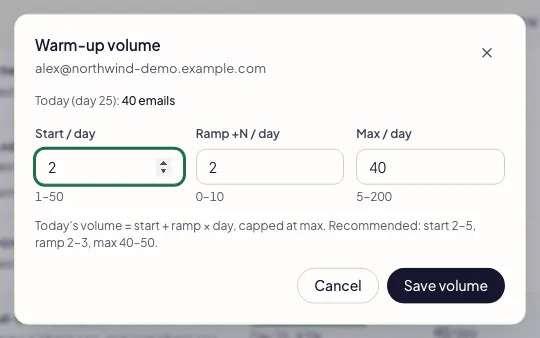
In a mailbox's row menu, choose Adjust volume. Three boxes:
- Start / day: 1 to 50.
- Ramp +N / day: 0 to 10. At 0 the volume stays flat at the start value.
- Max / day: 5 to 200, at least the start value.
Today's volume is the start plus the ramp times the day, capped at the maximum. The screen suggests a start of 2 to 5, a ramp of 2 to 3 and a maximum of 40 to 50, and previews today's volume as you type.
4. Run warm-up now, or leave it
Warm-up runs on its own. Run warm-up now triggers a pass immediately. Row menus also have Enable warm-up and Disable warm-up for a single mailbox.
5. Choose whether the mailbox joins the network
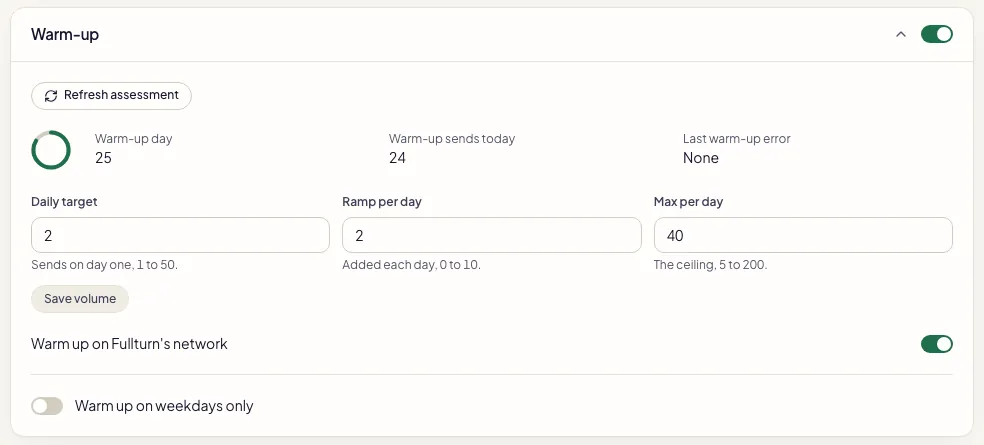
Open a mailbox and find the warm-up section. The switch Warm up on Fullturn's network is on by default. Turn it off and the mailbox warms up with your own team's mailboxes only.
6. Watch the numbers
The Warm-up page shows warm-up bounces, the seed-mailbox inbox rate, and a daily activity breakdown for the last 30 days. The Network section shows each of your mailboxes with what it sent and replied to today, its inbox rate over the last 7 days (the share of warm-up mail that reached the inbox) and a status.
How the warm-up network works
Fullturn runs one shared warm-up pool. Every mailbox with the network switch on sends warm-up mail to, and replies with, mailboxes of other teams as well as its own. A mailbox that opted out warms up with its own team only.
What crosses between teams is the warm-up text and nothing else. The messages are built from conversation content, never from your contacts, campaigns or templates.
As a customer you see your own mailboxes in the Network section plus one line about how many mailboxes of other teams you warm up with. Adding mailboxes that only join the network and never send campaigns is done by the workspace that runs the network.
Warm-up and the daily limit
Warm-up volume and cold-sending volume are different numbers. The daily send limit you set on a mailbox is a ceiling. Fullturn keeps the real limit lower until the mailbox has earned more, and shows each mailbox's limit for today when you launch a campaign. A mailbox that is paused or recovering sends less or nothing. See how to launch your first campaign.
Common errors and fixes
- No mailboxes to warm up yet
- Warm-up runs on connected mailboxes. Connect one and it appears here.
- Mailboxes failed to load: … Refresh to try again.
- Refresh the page.
- Warming, last send bounced
- The last warm-up email bounced. Fullturn counts it against the bounce record and slows or pauses the mailbox if the rate climbs.
- A warm-up partner address at example.com does not exist, so the email bounced.
- Nothing for you to do. Fullturn counts it and adjusts.
- Gmail asked Fullturn to try again later (a temporary error).
- Fullturn backs off that provider and retries on a later run. Nothing for you to do unless it repeats for days.
- Gmail no longer accepts this mailbox's sign-in.
- Warm-up for it pauses until you reconnect the mailbox in Sending setup. For Gmail, make a new app password; see the Gmail app password guide.
- Enter whole numbers — start 1–50, ramp 0–10, max 5–200 — and max must be at least the start value.
- Change the volume boxes to numbers in those ranges.
FAQ
- How long does warm-up take?
- It depends on your ramp. At the default start of 2 and a ramp of 2 a day, a company mailbox reaches its ceiling of 40 after about 19 days of ramping. Fullturn does not promise a number of days; it watches bounces and placement.
- Does the network send my emails to other people?
- No. Network mail is warm-up text between warm-up mailboxes. It never uses your contacts, campaigns or templates.
- Can I turn warm-up off?
- Yes, per mailbox from its row menu. A mailbox with no warm-up history sends less safely, so only do it for a mailbox that already has a long sending record.
- Why is my mailbox allowed fewer cold emails than its daily limit?
- The daily limit is a ceiling. A new, throttled or recovering mailbox is held lower, and the launch check shows each mailbox's limit for today.
- Do I need warm-up if I send few emails?
- A new mailbox still has no reputation. Warm-up is on by default for that reason.