How to connect Wix to Fullturn to publish blog posts automatically
By the Fullturn team · · 5 min read
Fullturn publishes to Wix through the Wix Blog API. You give it an API key from your Wix account and your Wix site ID; Fullturn then creates each article as a draft post in your Wix Blog and publishes it.
What you need first
- A Wix site with the Wix Blog app added.
- A Wix account that can create API keys for that site (the site owner).
- An API key with permission for the blog. Fullturn's connector is built to need two permissions: Manage Blog and Manage Ricos Document. The second one converts the article's HTML into the rich text Wix stores.
- Your Wix site ID.
Steps
1. Create the API key in Wix
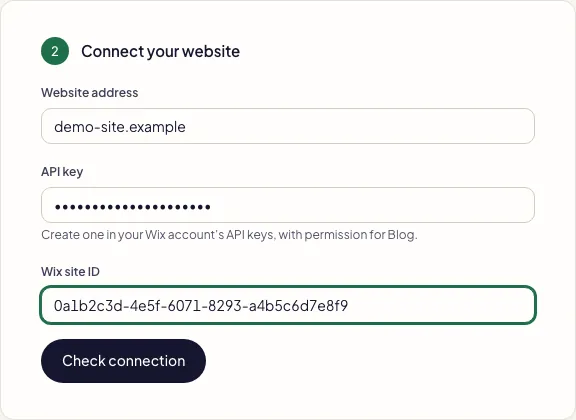
In your Wix account, open the API keys area (account settings) and generate a new key. Give it a name such as Fullturn, and grant it the blog permissions listed above. Copy the key when Wix shows it. Wix changes its screens from time to time, so follow Wix's current help if the labels differ.
Screenshot: Wix API keys page with Manage Blog and Manage Ricos Document permissions ticked 2. Find your Wix site ID
The site ID is the long identifier in your Wix dashboard address for the site. Copy exactly what Wix shows.
3. Start the setup in Fullturn
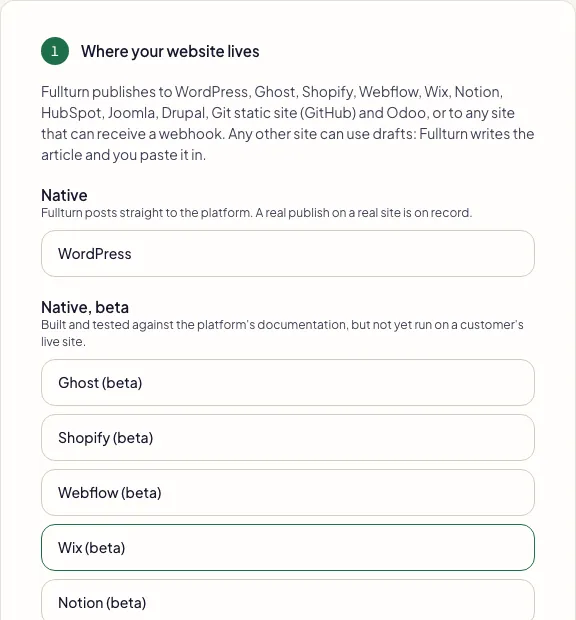
In Fullturn, open Content and start Set up your website. In step 1, choose Wix. It is marked beta. Press Continue.
4. Enter your details and check the connection
In step 2, fill in Website address (your public Wix address), API key and Wix site ID, then press Check connection. Fullturn makes one read-only request to your Wix Blog to see that the key is accepted; it publishes nothing.
- Fullturn can connect to your Wix site. Fullturn adds the site and saves the connection.
- Wix refused these details. Check the key or token and try again. Wix rejected the key or site ID.
- Fill in every Wix field. A box is empty.
5. Let Fullturn read your site, then choose how it publishes
Steps 3 and 4 import your site and set the SEO language. Then open Content, Site settings, Autopilot, and choose Review queue while you are on beta, so each article waits for your approval.
What to know about Wix publishing
- Fullturn creates a draft post, updates the draft when it edits an article, and publishes it.
- Wix limits a post title to 200 characters and a slug to 100. Fullturn refuses a longer one before it sends anything and tells you which article to shorten.
- Wix converts at most 30,000 characters of HTML into a post. A longer article is not cut off: Fullturn refuses it and sends nothing.
- Images go in as a web address of an image already hosted somewhere. Fullturn does not upload files to the Wix Media Manager.
Common errors and fixes
- Wix refused these details. Check the key or token and try again.
- The key was not accepted, or the site ID is wrong or from another site. Make a new key with the blog permissions and copy the site ID again.
- Wix answered in an unusual way, so Fullturn did not save the connection.
- Wix replied, but not in the way Fullturn expects from a Wix Blog. Check the site has the Wix Blog app and the key has Manage Blog, then try again. Fullturn saved nothing.
- Paste the site ID exactly as Wix shows it.
- The site ID may contain only letters, numbers and dashes. Remove spaces and anything around it.
- Wix limits a blog post title to 200 characters; this title has 214. Shorten it before publishing — nothing was sent to Wix.
- Edit the article's title in Fullturn, then publish again.
- Wix converts at most 30000 characters of HTML into a blog post; this article's HTML has 31877. It was not truncated and nothing was sent to Wix.
- Split the article into two, or shorten it, then publish again.
- Wix did not return a rich-content document for the article HTML. Nothing was published.
- The conversion step failed. Check that the key has Manage Ricos Document, then try again.
- Wix did not confirm the published post ID. Reconcile the destination before retrying.
- Wix answered, but without the post's ID. Open your Wix Blog and check whether the post exists before you publish again, so you do not get a duplicate.
- Wix reports this post as UNPUBLISHED, so it has no public URL yet
- The draft exists but is not live. Publish it from Wix or retry from Fullturn.
FAQ
- Is Wix publishing supported?
- It is in beta. The connector is complete and tested, but there is no recorded publish on a customer's live Wix site yet. Fullturn says so on the setup screen.
- Does Fullturn upload images to Wix?
- No. It passes an image web address. Wix's Media Manager upload is not part of the connector.
- Can Fullturn update a post it already published?
- Yes. It updates the draft post it created and publishes again.
- What if I do not use Wix Blog?
- Fullturn publishes to the Wix Blog. For a Wix site with no blog, add the Wix Blog app first, or use drafts mode, where Fullturn writes and fact-checks the article and you paste it in.
- Where do I turn on automatic publishing?
- Content, Site settings, Autopilot, Publishing. The default is the review queue.